Keeping Gmail signed in is convenient, but there are times when you want a clean logout, better privacy, or a quick switch to another account. If you are searching for how to sign out gmail in huawei phone, the process is straightforward once you know where Huawei stores Google account controls.
On Huawei devices, signing out is usually a two-part action: first, exit Gmail itself, then remove the Google account from the phone if you want a full sign-out. That is the safest way to stop mail sync and prevent the account from staying active on the device.
Sign Out From Gmail First
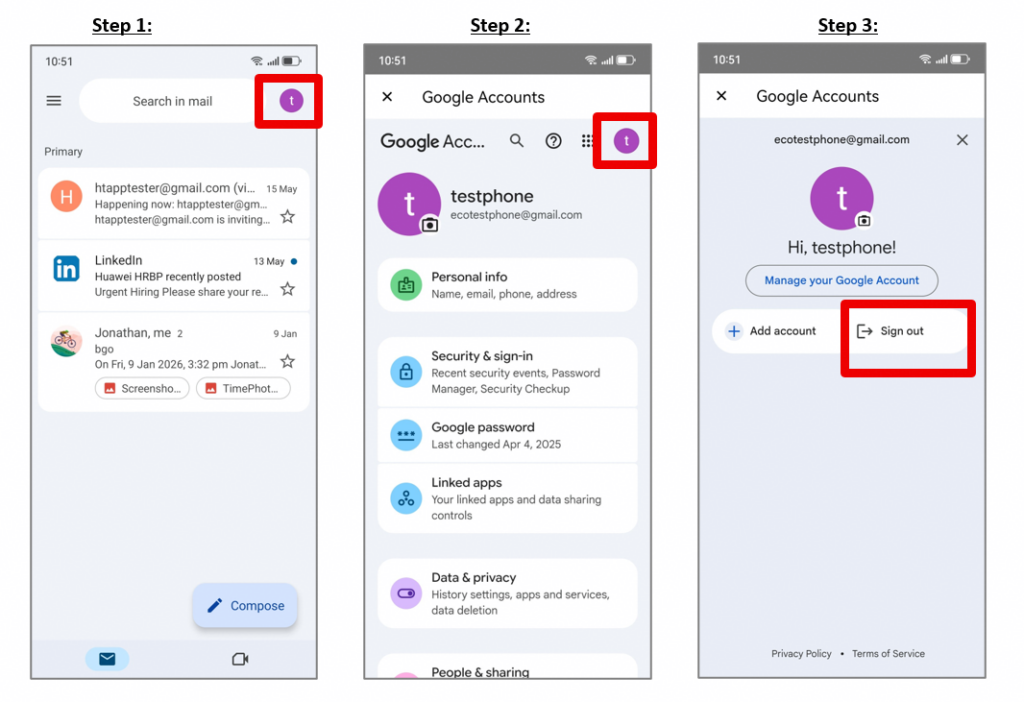
Start inside the Gmail app. Tap your profile icon in the top-right corner, then choose Manage your Google Account. From there, open the account profile and select Sign out if the option appears on your device. This step helps you leave the app session, but it may not fully disconnect the account from the phone.
Remove the Google Account in Settings
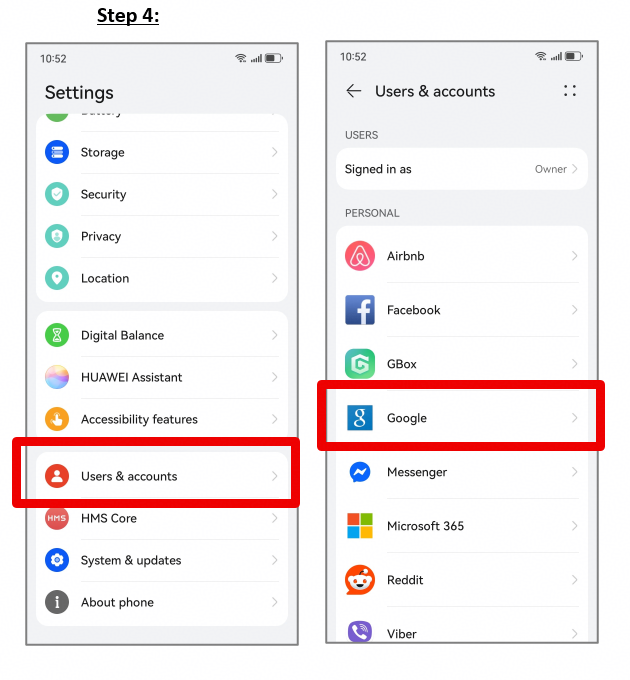
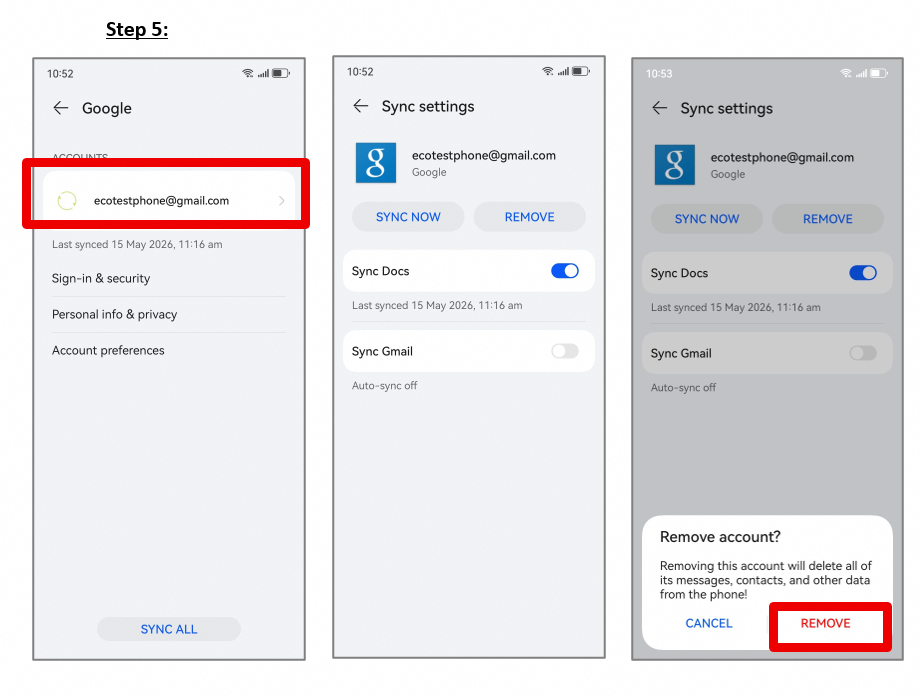
For a complete logout, go to Settings on your Huawei phone and open Users & accounts. Select Google, then choose the email account you want to remove. Tap Remove, confirm it again, and wait for the phone to finish the change. Once removed, Gmail will stop syncing on that device.
Open Settings.
Tap Users & accounts.
Choose Google.
Select the Gmail address you want to sign out.
Tap Remove, then confirm.
What Changes After You Remove It
After you complete how to sign out gmail in huawei phone, the account stays active on Google servers, but it will no longer sync mail, contacts, or calendar data on that Huawei device. If you only wanted to stop notifications, this is usually enough. If you want to use Gmail again later, you can always add the account back in Settings.
Common Issues To Watch For
If Remove is missing, the account may be tied to a work profile, device admin setting, or another system restriction.
If Gmail still shows old mail, restart the phone once after removal and check whether sync is still enabled for another Google account.
If you have more than one account, make sure you are removing the correct email address before confirming.
If you want the Huawei community version of how to sign out gmail in huawei phone, the same path applies: open Gmail, check the Google account menu, then remove the account from Settings > Users & accounts > Google.
When the phone is shared, handed over, or used for a new account setup, this method keeps the old Gmail account from staying connected in the background.
Equipped with a Bachelor of Information Technology (BIT) degree, Lucas Noah stands out in the digital content creation landscape. His current roles at Creative Outrank LLC and Oceana Express LLC showcase his ability to turn complex technology topics into engaging, easy-to-understand content for their websites.
Lucas specializes in writing technology guides. His work is distinguished by its clarity and relevance, making daunting tech subjects accessible and interesting to a broad audience. His guides are not just informative but are a testament to his skill in bridging the gap between technical expertise and everyday usability.
In addition to his tech-focused articles, Lucas has a keen eye for capturing the essence of his surroundings. His writing transcends technology, as he effortlessly brings to life various observations and experiences in his articles. This versatility not only demonstrates his wide-ranging interests but also his ability to connect with readers on multiple levels.
Lucas Noah’s writing is a fusion of technical acumen and a deep appreciation for the world around him, offering readers a unique and insightful perspective on both technology and life.


