microG and GBox often appear in the same Huawei setup, which makes it easy to assume they do the same job. They do not. Huawei’s guide gives each one a clear role: microG supports Google sign-in and background services, while GBox is the gateway used when an app is not available directly in AppGallery.
Where microG appears
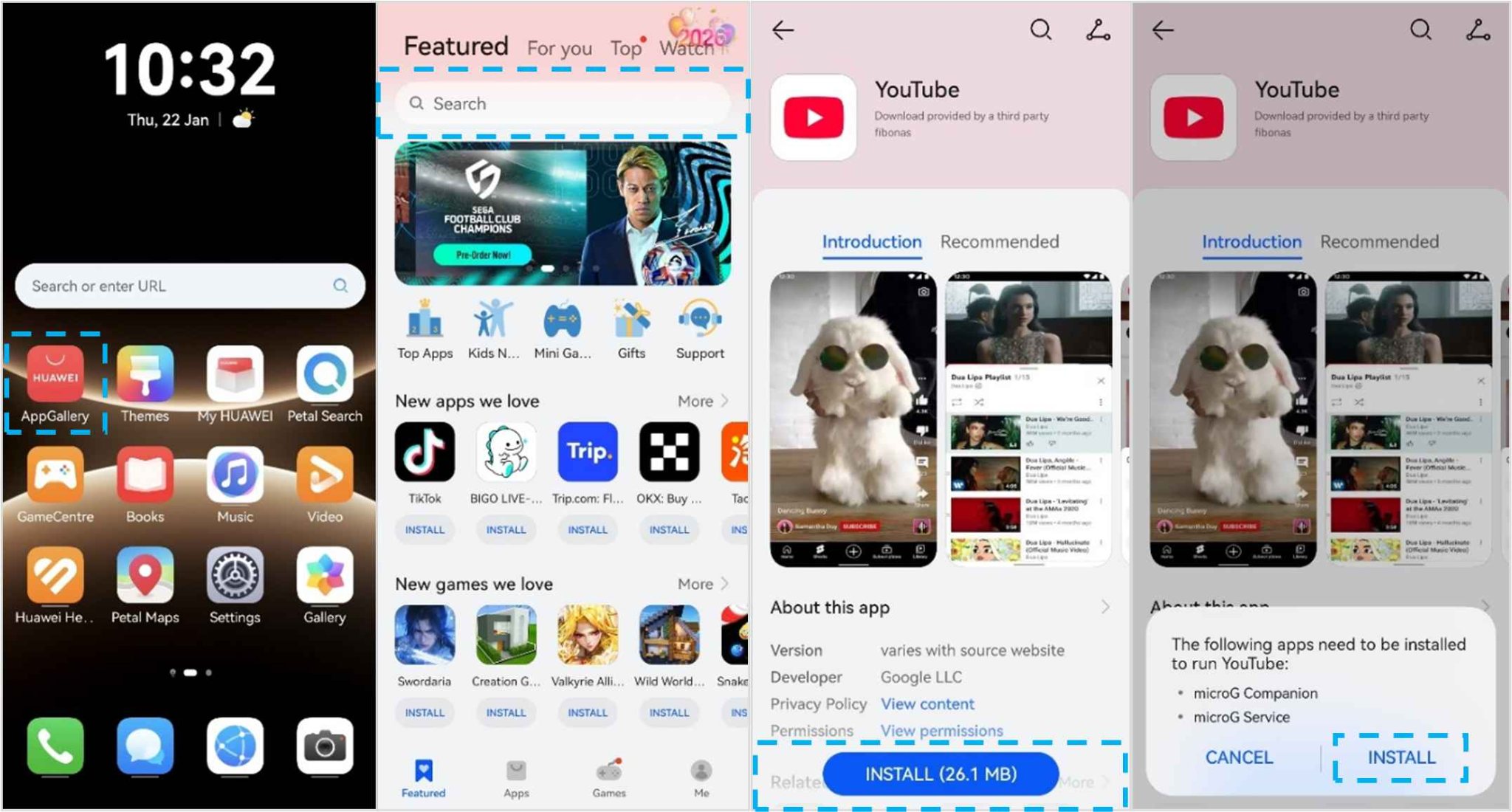
Start with YouTube in AppGallery. Search for the app, tap Get, and install it. When the phone says additional apps are needed, tap Install.
microG Companion and microG Service are then installed automatically. You do not need to download them separately. They are introduced because the Google app needs supporting services to run correctly.
How microG handles sign-in
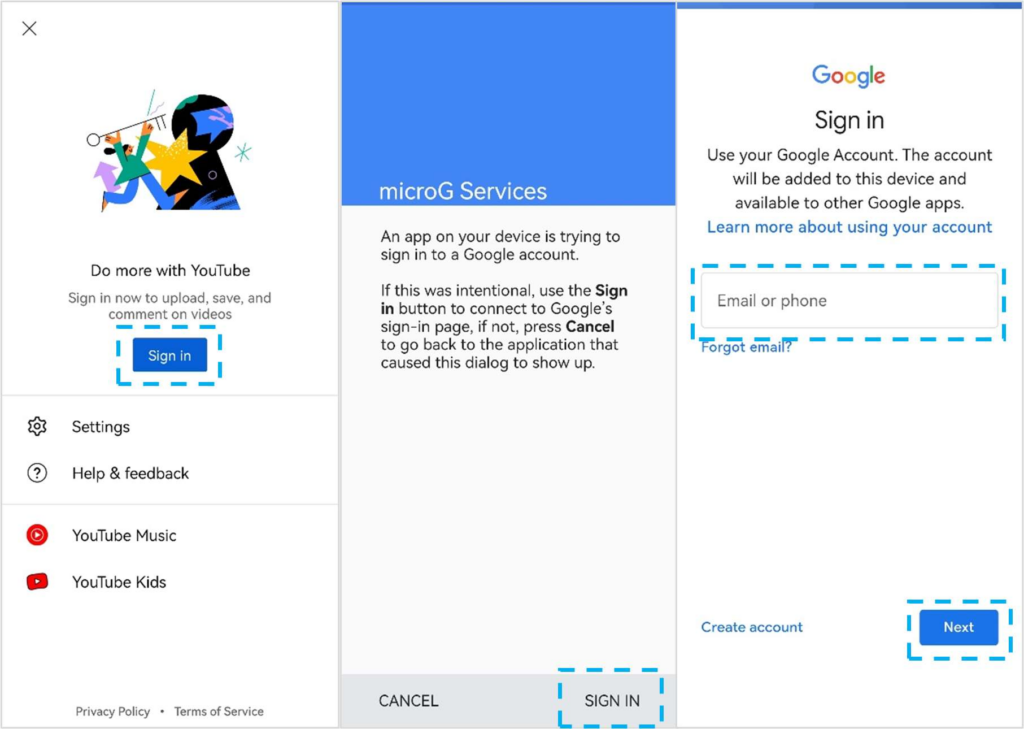
Open YouTube and tap Sign in. You are redirected to microG Services. Tap SIGN IN once more, and the regular Google account interface appears.
This is microG’s main role in the setup described by Huawei: it enables secure Google sign-in and background services. That is why removing microG after the app starts working is not recommended.
Where GBox appears
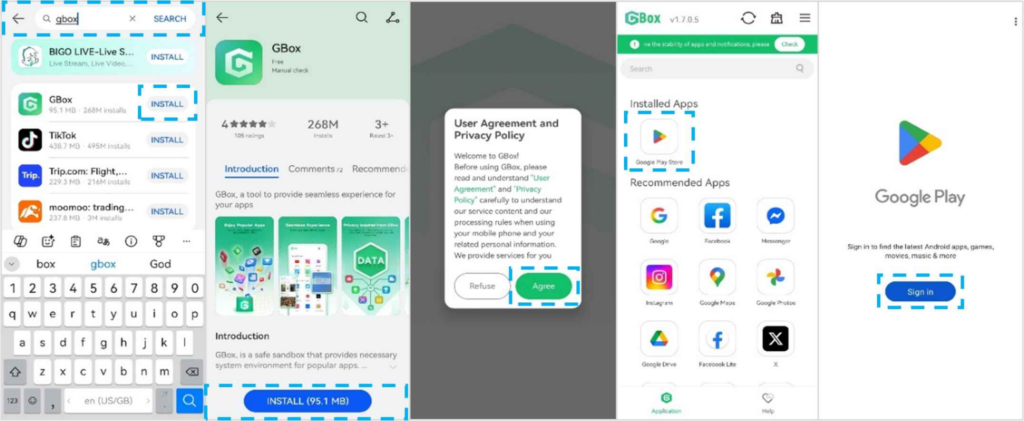
GBox comes later. If an app is not available in AppGallery, search for GBox in AppGallery and install it. Open GBox, sign in, and you are redirected to Google Play inside GBox.
From there, search for the missing app. Huawei’s example is Netflix. This is the part of the huawei google play store setup that gives access to Google Play when AppGallery does not have the app you want.
A simple way to picture the setup
Think of the process as three layers. AppGallery is where you start. microG supplies the Google sign-in and background services needed by supported Google apps. GBox is the separate route that gives access to Google Play when the app is not available directly in AppGallery.
The update flow follows the same logic. AppGallery has its own Update section, while GBox apps are updated in batches. That is why Huawei’s note about keeping GBox, microG Companion, and microG Service installed matters: each piece belongs to a different part of the setup.
Once those roles are clear, there is no need to treat every Google app as a new technical problem. You can simply identify which layer the app is using and maintain it from there.
Why both may need to stay installed
Huawei’s tips explicitly say not to uninstall GBox, microG Companion, or microG Service. Each supports a different part of the working environment.
microG helps Google apps sign in and continue background services. GBox supports apps installed through the Google Play environment inside GBox. Removing one can affect apps that depend on it.
Updates are split between the two routes
For AppGallery updates, go to Me > Update. If you see a message about updates from third-party sources, tap Update. Apps downloaded through GBox update automatically in batches.
This split is easier to understand once you remember where the app came from. AppGallery and GBox do not use exactly the same update path.
The easiest way to remember the setup
The huawei google play store workflow can be summarized without technical language: search AppGallery first, let microG install when a Google app requests it, use GBox when AppGallery does not have the app, and keep all three supporting components installed.
Once you know what microG and GBox actually do, the process stops looking like a collection of random utilities and starts to feel like one connected setup.
Equipped with a Bachelor of Information Technology (BIT) degree, Lucas Noah stands out in the digital content creation landscape. His current roles at Creative Outrank LLC and Oceana Express LLC showcase his ability to turn complex technology topics into engaging, easy-to-understand content for their websites.
Lucas specializes in writing technology guides. His work is distinguished by its clarity and relevance, making daunting tech subjects accessible and interesting to a broad audience. His guides are not just informative but are a testament to his skill in bridging the gap between technical expertise and everyday usability.
In addition to his tech-focused articles, Lucas has a keen eye for capturing the essence of his surroundings. His writing transcends technology, as he effortlessly brings to life various observations and experiences in his articles. This versatility not only demonstrates his wide-ranging interests but also his ability to connect with readers on multiple levels.
Lucas Noah’s writing is a fusion of technical acumen and a deep appreciation for the world around him, offering readers a unique and insightful perspective on both technology and life.